









Quick take: By how and where you solder, not by brand name. If you need a soldering iron that can move between cordless repairs and a powered workbench, the HOTO SNAPBLOQ™ I-A06 is built for that range of use. HOTO and Fanttik both offer portable soldering solutions, so the two names may appear together when users compare cordless soldering irons. This guide focuses on the verified HOTO SNAPBLOQ I-A06 specifications and gives you a clear checklist for evaluating any competing model, including power mode, temperature range, heat-up conditions, tip compatibility, included accessories and storage design.
HOTO SNAPBLOQ I-A06 specifications at a glance
|
Specification |
HOTO SNAPBLOQ I-A06 |
|
Cordless output power |
Up to 60W in battery mode |
|
Plug-in output power |
Up to 140W in plug-in mode |
|
Heat-up time |
3 seconds to 400°F at room temperature, using USB-C power with a 400°F setting |
|
Temperature range |
100–450°C |
|
Temperature control |
PID control; 5°C adjustment steps |
|
Temperature presets |
Three customizable presets: M1, M2 and M3 |
|
Battery |
2000mAh lithium-ion; 3.6V rated voltage |
|
Published weight |
148g |
|
Published dimensions |
201 x 25 x 33mm |
|
Included soldering tips |
Three: C245-B, C245-KU and C245-C2 |
|
Other included items |
Storage box, soldering stand, cleaning sponge and USB-C cable |
Figures are drawn from HOTO’s product specifications and instruction manual. The heat-up figure uses the conditions stated above.
Up to 60W cordless and 140W plugged in
HOTO SNAPBLOQ I-A06 offers two power modes in the same tool. Battery operation provides up to 60W, allowing the iron to be used without a power cable attached. Plug-in operation raises the published maximum output to 140W. The distinction matters: 140W describes the plug-in mode, while 60W is the cordless maximum.
For a setup that moves between portable work and a powered bench, this gives you a choice of supply without changing irons. The built-in 2000mAh battery supports cordless use, and the higher plug-in maximum provides another operating option when external power is available. You can choose the mode that fits the work area while keeping the same iron, controls and tip selection.
Three-second heat-up to 400°F on USB-C power
HOTO specifies a three-second heat-up to 400°F under room-temperature test conditions, using USB-C power with the iron set to 400°F. That is a defined heating benchmark, with both the target temperature and power source stated.
The I-A06 also supports temperature settings across 100–450°C, so you can select a working temperature to suit the task. The three-second figure refers specifically to the stated 400°F test point and USB-C supply. The selected working temperature and the initial heat-up benchmark describe different parts of the iron’s operation.
100–450°C PID control with three customizable presets
The HOTO SNAPBLOQ I-A06 uses PID temperature control and lets you select temperatures from 100°C to 450°C. A paddle toggle handles adjustments in 5°C steps. Short-pressing the toggle cycles through three presets, M1, M2 and M3; each preset can be customized in the settings menu.
This gives you a straightforward way to save frequently used temperatures and return to them as your work changes. The display shows the tip temperature, set temperature, current power and battery level, keeping the main operating information on the iron. Left- and right-handed display modes let you choose the orientation that suits your grip.
The display also remains active during cooling after shutdown, showing the tip temperature. The manual instructs users to allow the iron to cool before storage, so shutdown and storage readiness remain distinct parts of the workflow.
Three C245 tips for different soldering tasks
The HOTO SNAPBLOQ set includes three replaceable C245 tips. HOTO identifies the C245-B for precision SMD work, the C245-KU for drag soldering and the C245-C2 for tasks with greater heat demand. The different tip shapes give the kit more than one way to approach a joint.
Tip selection belongs alongside the power and temperature settings when planning a job. The included selection lets you choose among three head shapes within the same kit. For replacement or third-party tips, confirm compatibility with the I-A06 before purchasing.
Modular storage with a stand and cleaning accessories
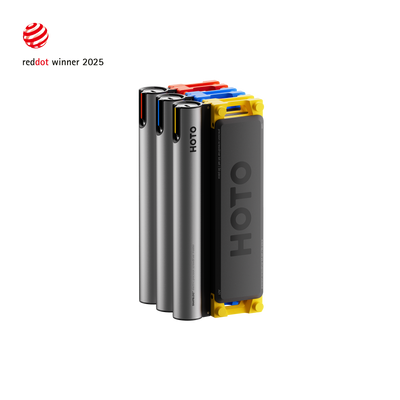
SNAPBLOQ’s storage design covers the accessories used around the iron. The iron connects to the storage box through a snap-fit structure and releases with a twist. The two halves of the box connect magnetically and can separate completely, giving access to the stored tips, stand and cleaning sponge.
The stand unfolds for use and can also be removed from the box; the sponge is removable as well. After the iron has cooled, the components can be returned to their storage positions. A USB-C cable is included with the set.
The storage module can also stack with other SNAPBLOQ modules. This allows the soldering kit to join a wider HOTO tool setup as your collection grows. The benefit extends from carrying the kit to arranging tools and accessories in one consistent system.
Why choose HOTO SNAPBLOQ for your soldering setup?
Choose HOTO SNAPBLOQ if you want one iron for cordless use and plug-in operation, with a clearly specified maximum for each mode. Its combination of battery operation and external power support makes it worth considering for a setup that serves both portable work and a fixed bench.
It also suits users who want adjustable temperature settings, visible operating information and quick access to saved presets. The three included C245 tips add a choice of working shapes, while the stand, sponge and modular storage keep the surrounding equipment together. These are the concrete HOTO capabilities to consider when weighing your priorities.
FAQ: HOTO vs Fanttik soldering iron questions
HOTO or Fanttik: which cordless soldering iron should I choose?
The HOTO SNAPBLOQ I-A06 combines cordless handling, precise temperature control and integrated tool storage in one portable soldering system. It delivers up to 60W in battery mode and up to 140W in plug-in mode, with PID temperature control across a 100–450°C range and three customizable presets.
Is HOTO SNAPBLOQ a good alternative to a traditional soldering iron?
The HOTO SNAPBLOQ I-A06 combines HOTO’s signature design aesthetic with outstanding performance. It delivers up to 60W in cordless mode and 140W in plug-in mode, along with 100–450°C PID temperature control, three customizable presets and three interchangeable C245 tips for different soldering tasks.
How should I compare HOTO and Fanttik soldering iron heat-up speed?
HOTO specifies three seconds to 400°F at room temperature, using USB-C power with a 400°F setting. That figure describes the stated test conditions, rather than every temperature or power mode.
Fanttik vs. HOTO: How does the accessory setup compare?
The HOTO SNAPBLOQ I-A06 is built around an integrated, modular accessory system. It includes three interchangeable C245 tips (C245-B, C245-KU and C245-C2), a soldering stand, a cleaning sponge and a USB-C cable, all organized in a magnetic storage box that stacks with other SNAPBLOQ modules. The built-in stand also supports a smarter workflow: when the soldering iron is placed on the stand, it automatically enters sleep mode and cools down. When picked up again, it returns to the previously set working temperature.
Related HOTO product information
HOTO SNAPBLOQ I-A06 product specifications and official product images
HOTO SNAPBLOQ I-A06 instruction manual
HOTO SNAPBLOQ modular tool system
Product information checked on September 11, 2026. Performance figures are HOTO’s published specifications; operating details follow the product manual.

Author: HOTO Team


